Boomchuck
Designing a high-level digital audio workstation for generating bluegrass accompaniment
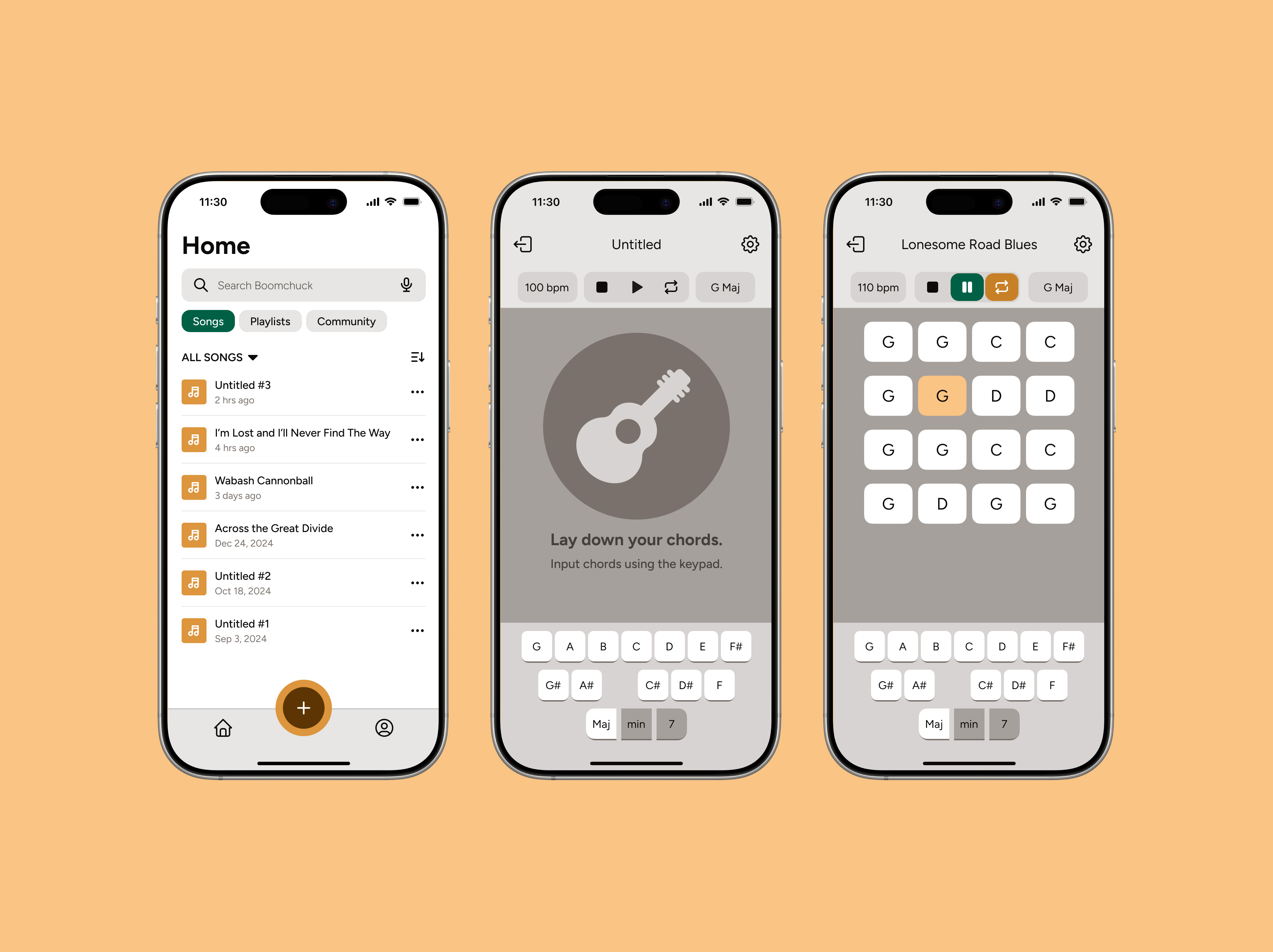
- Product designer
- UX engineer
- Sound designer
- Figma
- React
- TypeScript
- User research
- Usability testing
- Prototyping
Who are bluegrass learners and what do they need?
Bluegrass is an idiosyncratic genre of American music. Hailing from Appalachia, its distinguishing characteristics include its fast pace and "drive," its limited set of acoustic instruments, and its "boom-chuck" rhythm.
Bluegrass is highly collaborative music; a key component of learning bluegrass is the playing with other musicians in a jam setting. But for many bluegrass learners, it's precisely this part of the process that serves as an obstacle. At a bluegrass jam, no matter how welcoming the environment, there is some expectation of technical proficiency. Bluegrass learners feel ill-prepared to begin jamming.
It's no surprise that learners feel this way; bluegrass jams can demand a lot from musicians:
- Memorization of a large repertoire of songs (no lyrics, no lead sheets, no sheet music)
- Technical proficiency and fast speed, oftentimes up to 140 bpm
- Multitasking and responsiveness (singing while playing, improvising solos, nonverbal communication with other players)
The community has worked to address this problem with slow jams, meant for beginner musicians, but they are few and far between.
At a slow jam in my hometown, a fellow bluegrass learner asked me when the next jam would be. She was flabbergasted and disappointed when I told her she would have to wait an entire month just to slow-jam if she didn't want to spend over two hours driving (something I did in college and would highly advise against).
Bluegrass learners like her are passionate and eager, but often don't have the space needed to develop their skills and practice in a jam setting.
An idea: an interactive instrumental builder for bluegrass learners
Before bluegrass learners jump into jamming, they need support and opportunities for practicing with accompaniment. Where slow jams fail to meet needs is exactly where our digital product should help.
The state of digital accompaniment
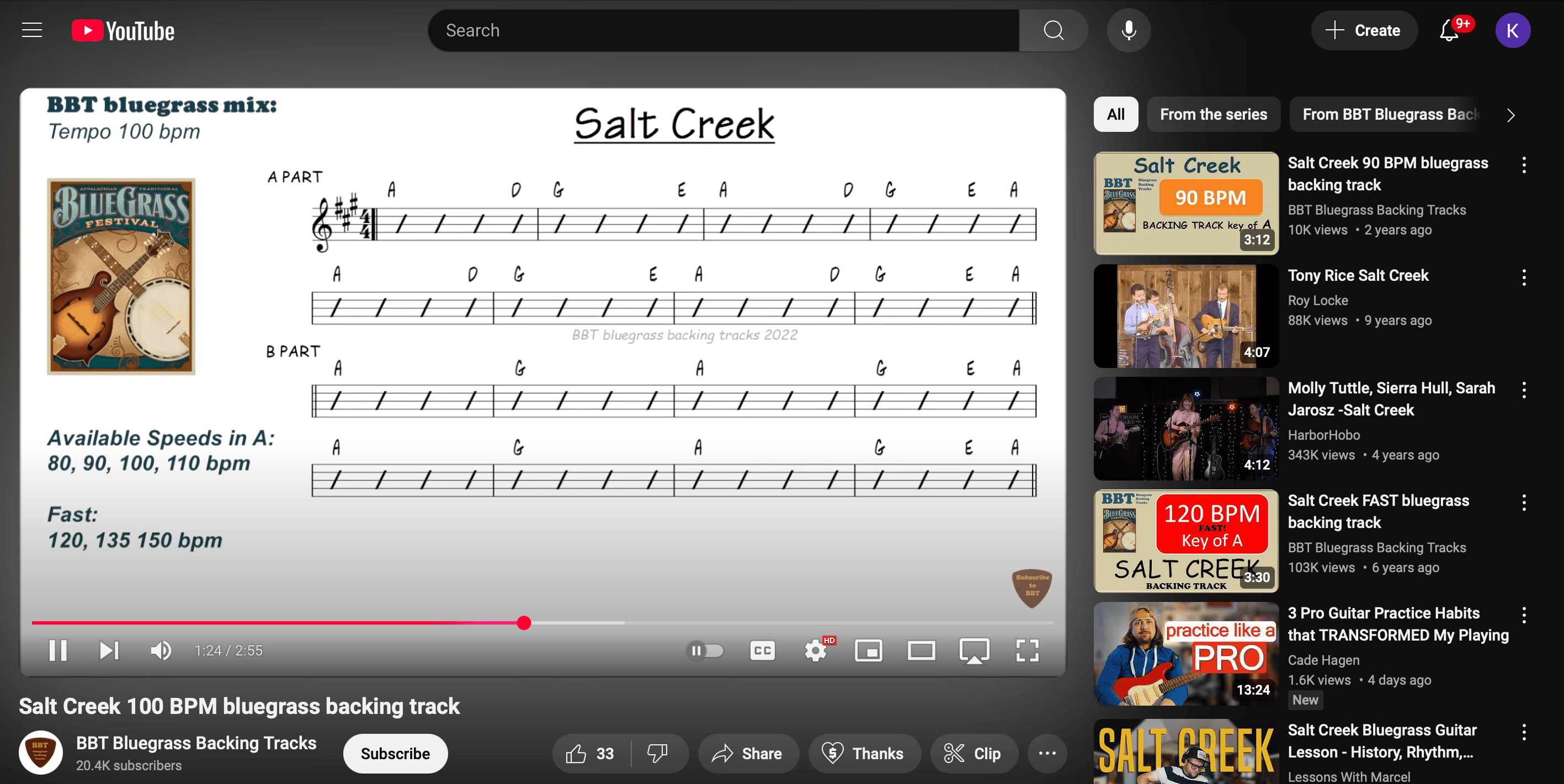
Digital accompaniment is not a new idea. Some bluegrass learners will use prebuilt backing tracks like these ones, built manually in digital audio workstations. The channel for this one, accepts requests for individual songs. While these tracks have their use, they are not scalable, and depend on a single individual's capacity to keep up with requests to meet needs.
These YouTube instrumentals have other limitations that make the user experience more difficult.
- Users cannot set a custom BPM value, and the speed feature is not exposed
- Users cannot track where they are in the song
- Bumper ads make practicing unpleasant
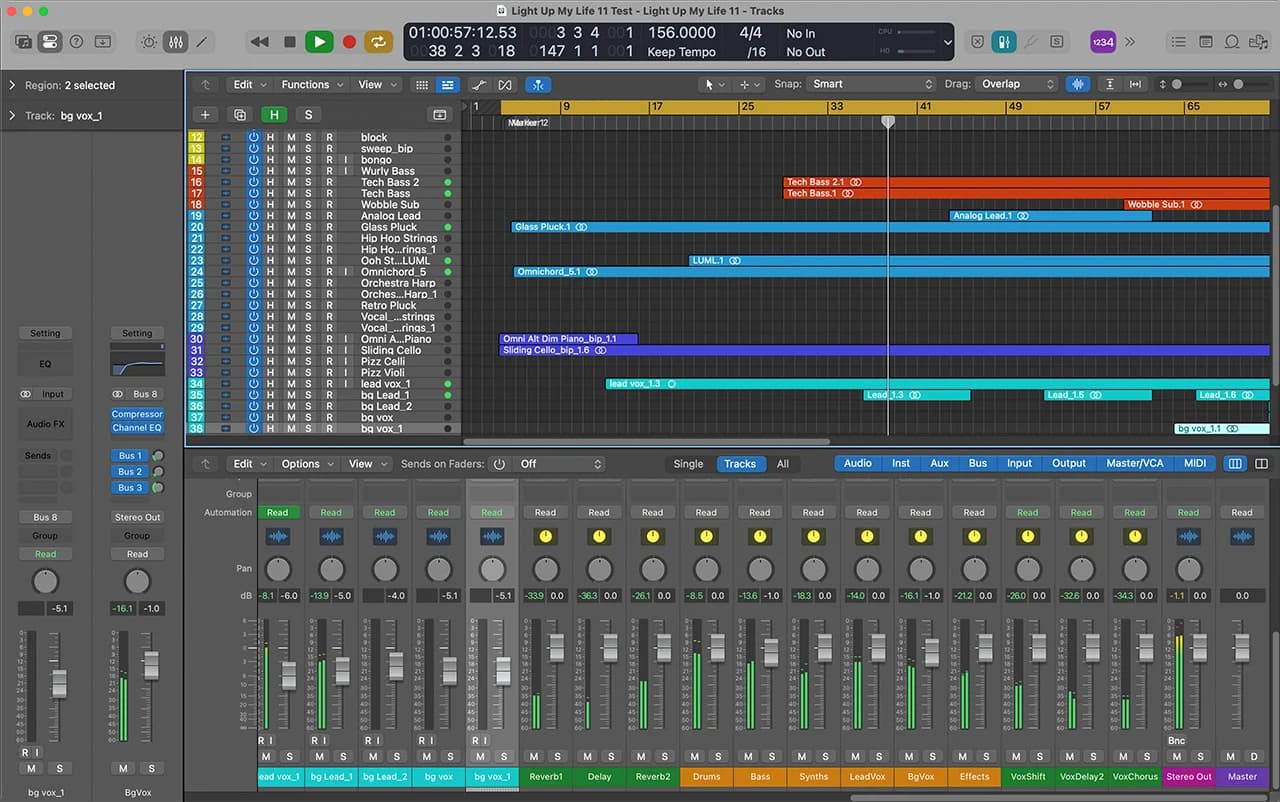
Another option for digital accompaniment is DIYing the backing track in a digital audio workstation (DAWs) like Logic Pro, FLStudio, or Ableton. This is inaccessible to many acoustic musicians, who may not know how to use these modern specialized tools for music production.
Users with production experience noted that DAWs often gave too much low-level control for building accompaniment. Bluegrass is modular music with repeating patterns, meaning that the added complexity is unneccessary.
As designers and developers, we are familiar with abstractions in our work; we abstract low-level parts into a higher-level whole to simplify our logic and workflow. The same goes for bluegrass musicians, who are not thinking about playing individual notes, but rather a "chunk" of music, executing the complexity mechanically and automatically with only the higher-level abstraction in mind.
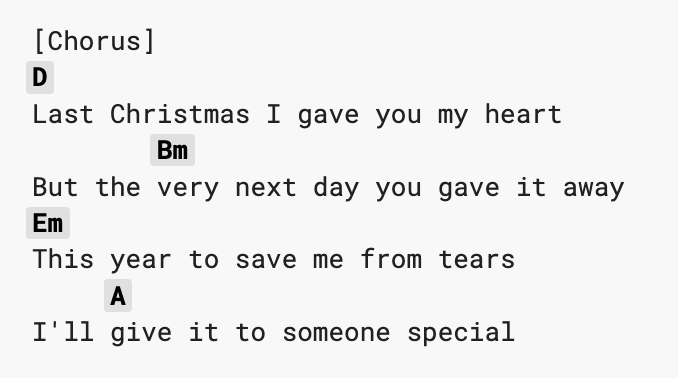
The 1970s' Real Book and Ultimate Guitar Tab (the world's most popular site for chords), reveal that when it comes to instrumental accompaniment, musicians across western vernacular genres, and across all levels, do not think in terms of individual notes. They think in terms of chords, consisting of the chord root (A, B, C...) and chord quality (Major, minor, dominant 7th).
Imagine how odd it would be if you looked up the accompaniment to "Last Christmas" and saw this:
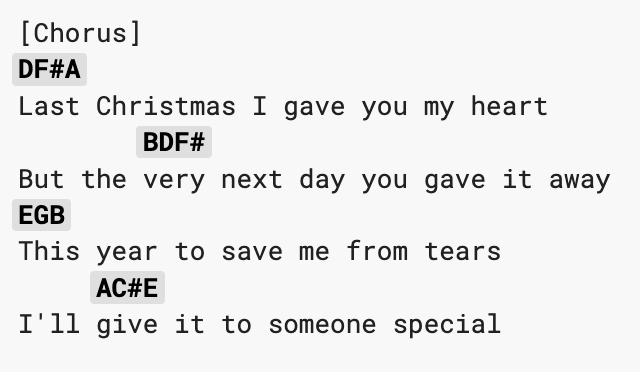
It provides nearly the same information, but the form doesn't match a musician's mental representation of accompaniment.
If musicians don't think about accompaniment as individual notes, the tools they use to build accompaniment should not either. Users' mental models are influenced by their beliefs and experiences. Our design's system model should align with this. Part of that task will be to match complexity and abstractions.
Exploring options
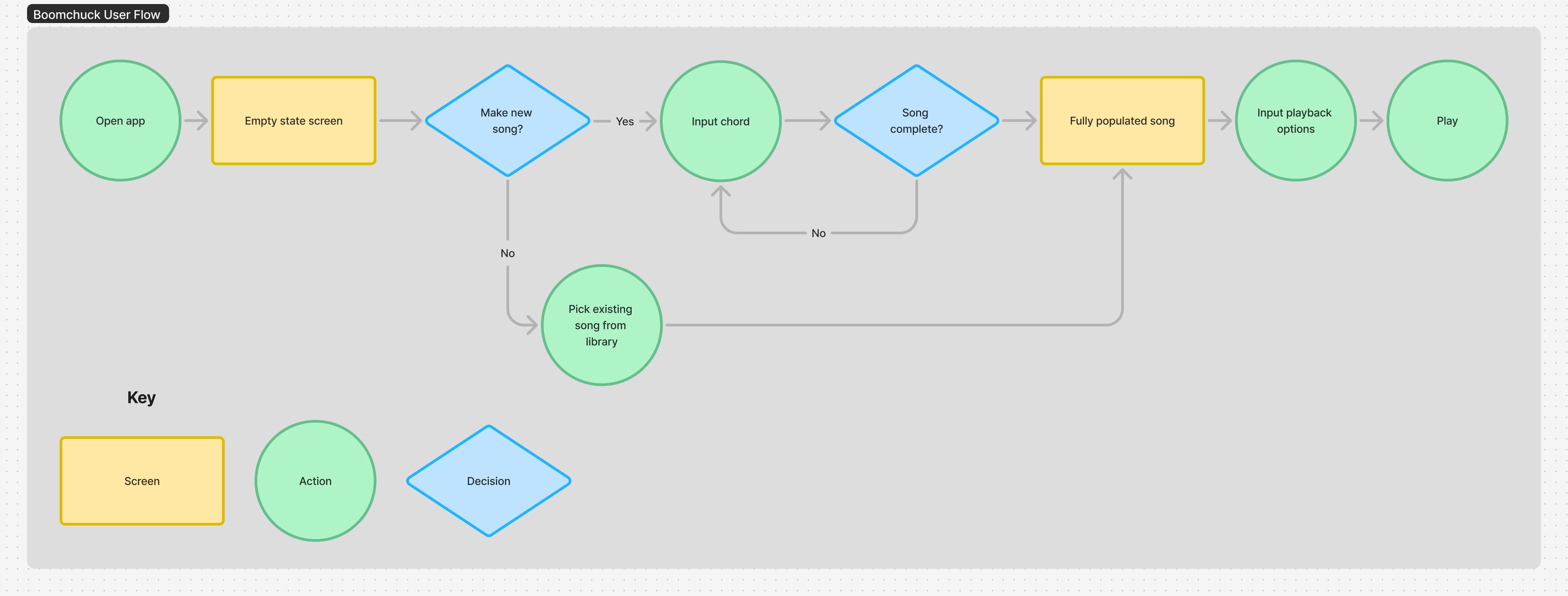
With early user research in mind, I drew user flows to diagram how a user would interact with the application.
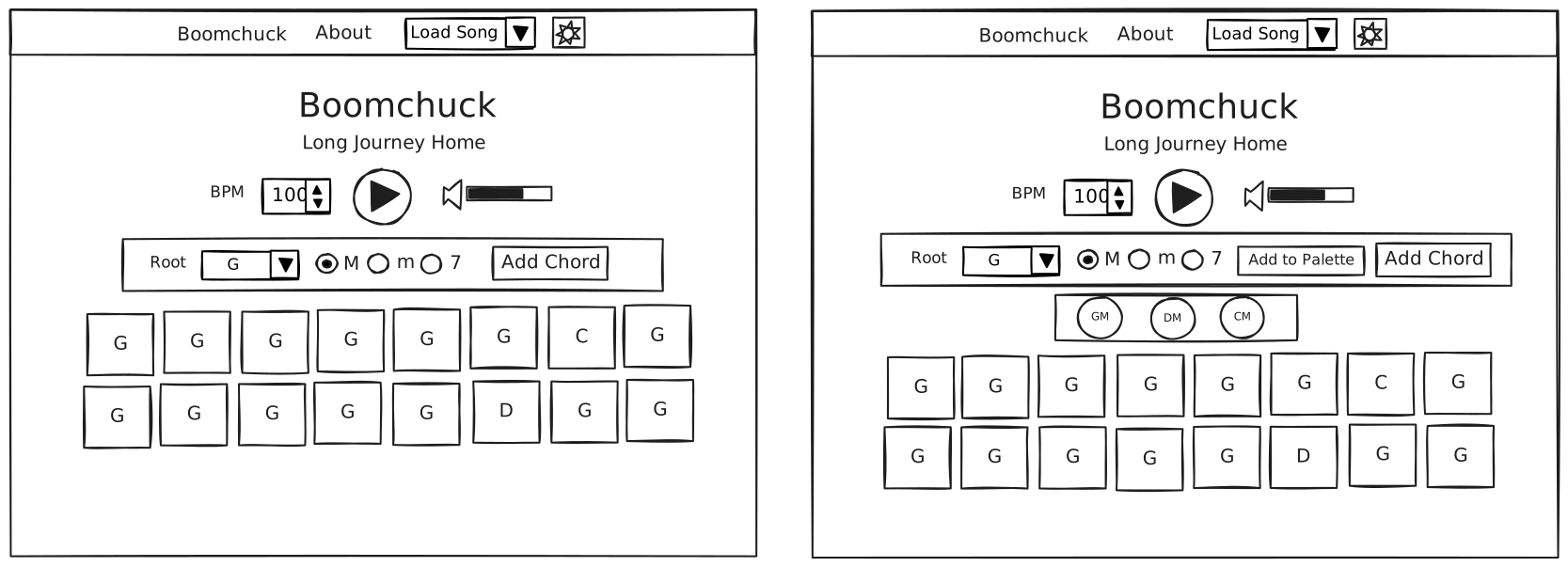
From there, I built out early wireframes. These early wireframes illustrate a naive attempt at matching the user's mental models. Chords are inputted with a combobox for the chord root, a radio button for the chord quality, and a button to add a chord for the duration of a beat. Noticing that the user might get tired of selecting the inputs, I added a "palette" feature to store commonly-used chords for quick access. To proceed with usability testing, I proceeded to translate the wireframes into testable low-fidelity prototypes using JavaScript and web audio.
Why code the prototype?
Boomchuck involves close interaction between visual and audio. We can think of the work that Boomchuck does as a function, where each visual state corresponds to a unique audio track.
With the interactive audio so integral to Boomchuck's function, there was no way around coding to build an interactive prototype that could give me any real information about the user experience. Without burdening the reader with details, it's a lot of math, a lot of acoustics, a lot of sound files, and a lot of automation that no prototyping tool can feasibly carry out.
Using React and prebuilt UI component libraries, I created a low-fidelity prototype. After conducting early user testing, I discovered that:
- There was not enough vertical space for users: if they scrolled to the bottom of a long passage, the play button would disappear
- The combobox element for selecting chords was unnatural and difficult to use
- It can be difficult to use a mouse when an instrument is hanging on your body
- Similarly, banjo and dobro players will have finger picks on their dominant hand
Noting that the combobox was finicky for most users, I added a "palette" feature that allowed users to add commonly-used chords to a palette. After testing this:
- It exacerbated the issue with vertical space
- It made the design harder to parse: why are there two places for chord input now?
The palette was not an appropriate solution to the chord input problem. Where it removed the complexity from inputting common chords, it added a new task, mental load, and took up valuable space on the screen. After some reflection, I decided to go back to the wireframes, keeping in mind important pieces of user feedback.
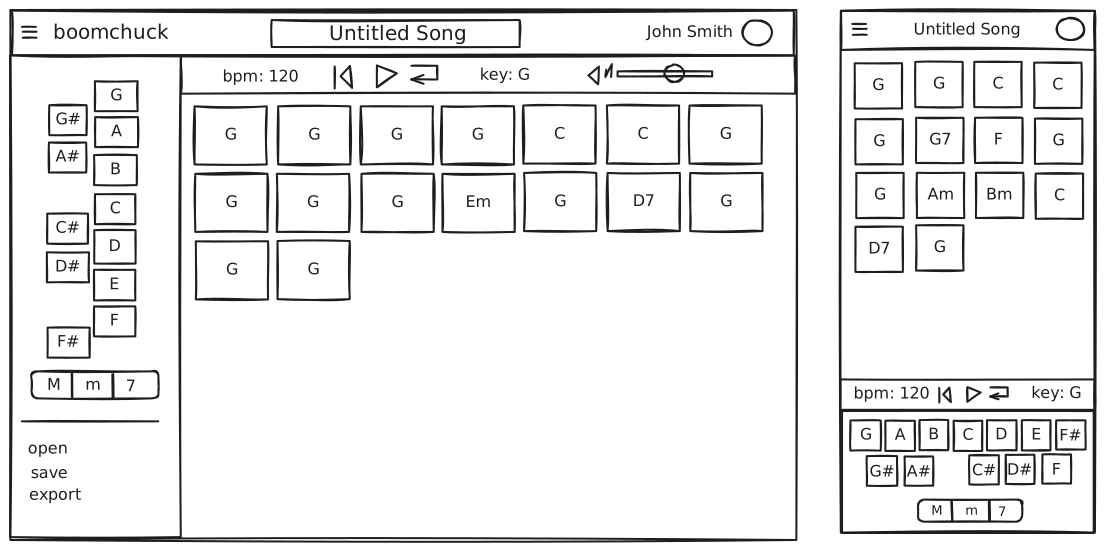
These new wireframes maximized vertical space, ensured that the play button would not dispapear, and most importantly, made chord input simpler and easier for users.
Maximizing vertical space and preventing forced scrolling
- I removed extraneous headings.
- I created a playback toolbar fixed directly underneath the top-level navigation.
- I moved chord input to the left side on desktop displays.
Further ensuring the play button doesn't disappear
- All elements on the screen are in fixed position other than the scrollable passage section.
- Users can make the song as long as they like without worrying about issues with scrolling.
Making chord input simpler
- I replaced the previous system for chord input with a keypad interface, including a segmented control for chord quality. Once chord quality is selected, users click once on the root to add a chord with the selected root and quality to the passage.
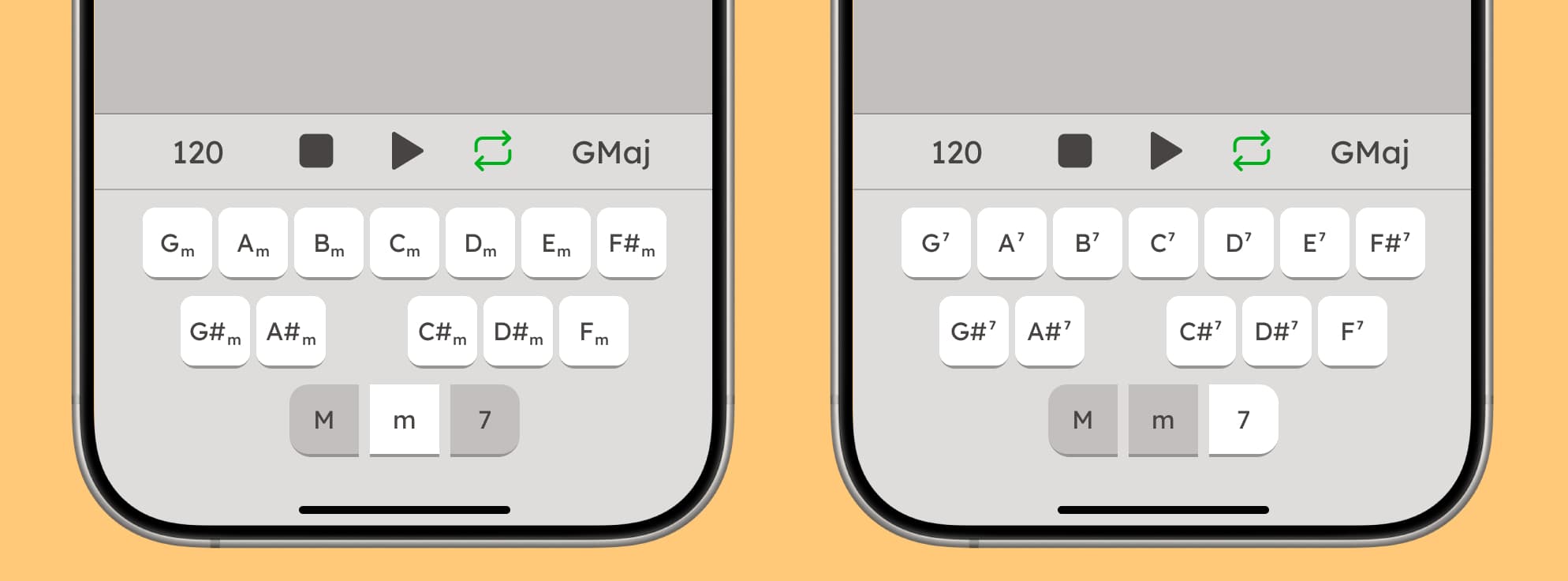
Designing for the screen and the speakers
Visual design decisions were foremost guided by ensuring ample contrast, readability, while still being pleasant, warm, and welcoming in tone.
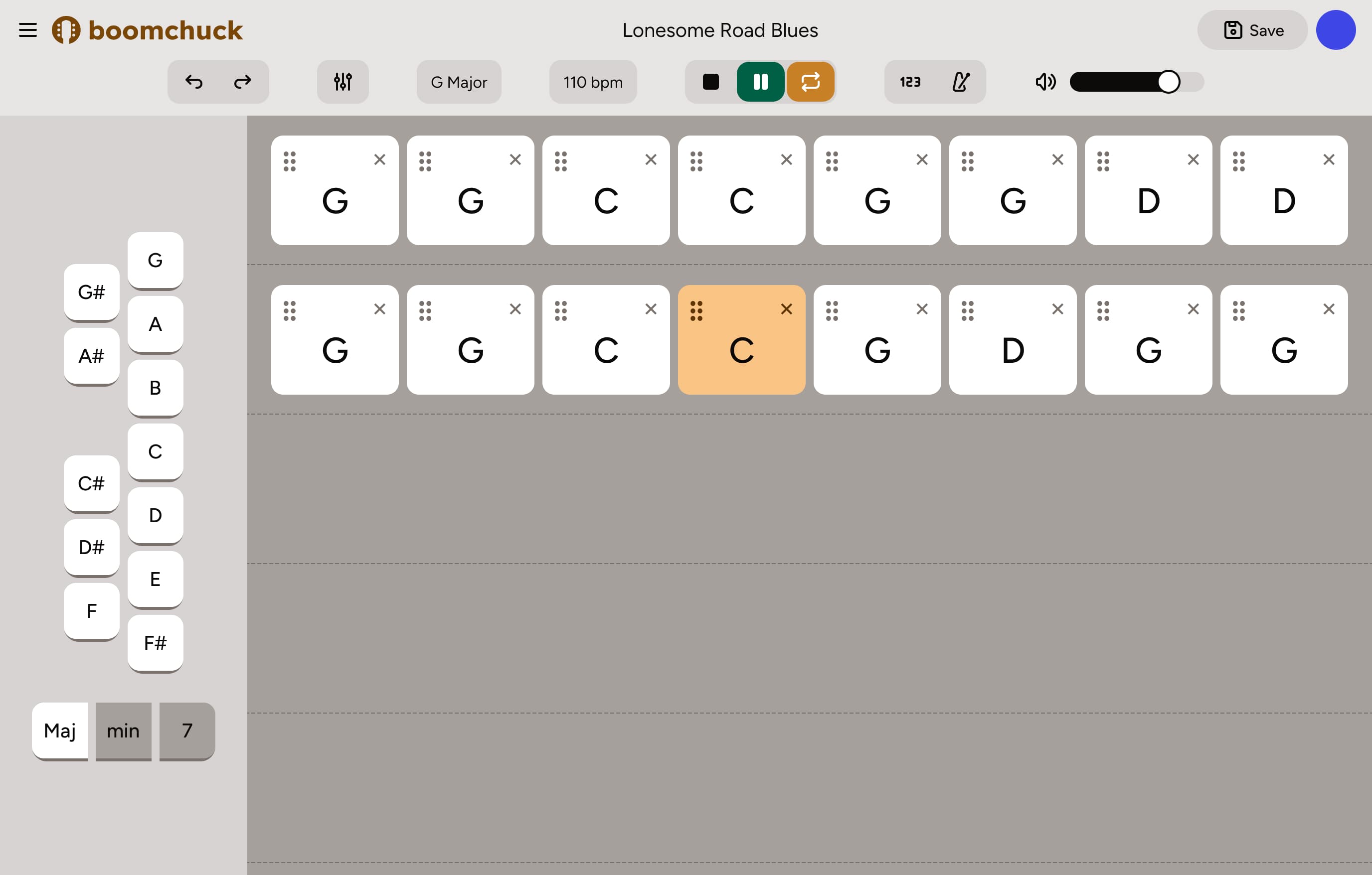
What's changed since our initial prototype?
- Larger touch targets
- Monochromatic design allows "active" chord in passage to stand out
- Chords can be rearranged or removed
- Chord blocks in passage are clearly distinguished from other interface elements
- Keyboard controls
Sound design
Compression and loudness
During early testing, we found that, depending on the instrument they played, users would sometimes have to max out their laptop volume, and even then could have difficulty hearing the instrumental. Dynamic range compression allows us to "compress" dynamic range, reducing the difference between the quietest and loudest signals in an audio track.
When uncompressed and compressed audio are normalized to their peaks (the highest signal level), the compressed audio will therefore be louder, and easier to perceive.
Reverb
The music we generate should be pleasant. It's important that we apply reverb to join the separately recorded and generated audio tracks. In real life, there would be room reverb as well. However, we should minimize the signal as to ensure the rhythm remains easily perceivable.
Technical and engineering concerns: who is in charge of these expensive audio operations?
- Tempo is effectively continuous and needs to react quickly to client interactions; has to be done on the client
- Reverb can be applied to audio samples before they reach the client
- Compression should be applied
How does the user interact with the audio?
- Each chord block plays one measure of the "boom-chuck" accompaniment rhythm using guitar and double bass samples
- The active chord block will be highlighted yellow so that the user knows where in the song they are
- The speed of the audio playback will be determined by the BPM inputted in the application shell
- Chords may be transposed to the key notated in the application shell
Wrapping it up
Over the course of this project, I built a mobile and web app that allows bluegrass learners to quickly build instrumental music that they can use to practice with accompaniment outside of a jam setting, which at times can be unavailable or inaccessible. I evaluated the state of digital accompaniment, and found that many existing interventions do not align with the mental models of musicians trying to practice quickly. With this in mind, I built out designs that allowed for quick input and easy customizability at the level of abstraction from which musicians approach accompaniment.
What I learned
Directly interacting with users is an essential part of the design process. It is where the most discovery can be made, and where the designer is both challenged and invigorated. Boomchuck evolved rapidly through user testing, and revealed problems that, as a designer, I would not have been able to anticipate on my own.
At the same time, a project like this one, which spans across many domains, reveals that as designers, we sometimes need to rely on our own expertise and understanding. That doesn't mean making decisions based on assumptions, but rather tapping into resources like evaluating existing patterns and compiling secondary research.